The Uninterrupted Assumption: Auditing Power Protection in UK Comms Cupboards
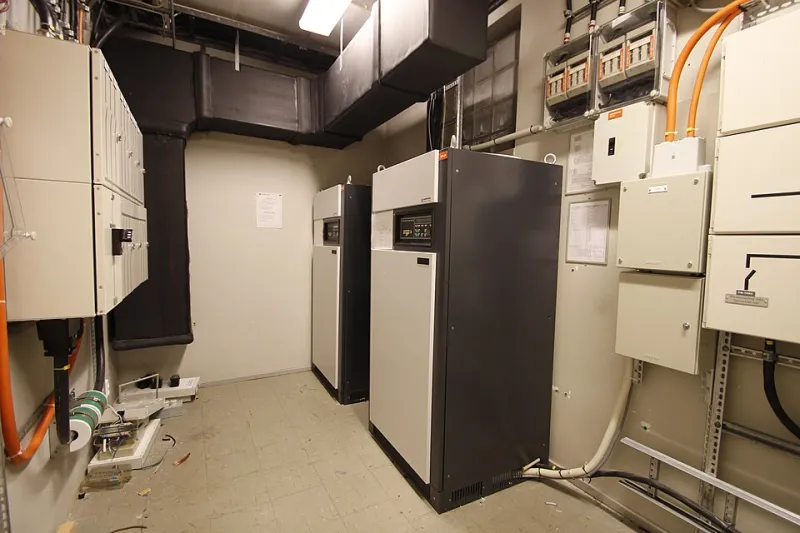
Photo: Work With Sounds, CC BY-SA 4.0, via Wikimedia Commons
A business can spend months specifying a new connectivity service, only to discover during a brief power interruption that the router, optical network terminal and telephone system were never designed to survive one. The comms cupboard is often treated as a passive space: a locked door, a shelf of blinking boxes and a tangle of cables. In practice, it is a small operational site that deserves the same discipline as any other part of the IT estate.
The cupboard is part of the service
For most UK SMEs, the communications cupboard contains more than a router. It may hold an optical network terminal, a network switch, a private branch exchange, power-over-Ethernet injectors, a security appliance and perhaps a small server. Some of these devices support revenue-generating work; others support emergency calls, building access or payment systems. If the mains supply fails, the question is not simply whether the internet connection is available. It is whether the business can still make calls, process transactions or reach the people it needs to reach.
A power-protection audit should therefore begin with service dependency rather than hardware specification. Which devices must remain available during a short interruption? Which can shut down cleanly? Which have no business-critical role and merely add load to an uninterruptible power supply that was never sized for them? The answers will differ between a professional services firm, a warehouse operation and a clinic, but the method is consistent.
Start with the socket, not the specification sheet
The first task is to map every device to its power source. A simple table is sufficient: device name, location, power draw, current supply route and whether that route is protected. Record whether each item is connected to a UPS, a surge-protected extension lead, a direct mains socket or a fused spur. Note any device powered through Ethernet, because a switch on a UPS may keep handsets alive while the router remains unprotected.
This exercise frequently reveals two problems. First, a UPS may protect the router but not the optical network terminal, leaving the connection dependent on equipment that loses power. Second, a large UPS may be supporting devices that do not need protection, reducing the runtime available to the equipment that does. Where carrier equipment is involved, clarify who owns it and who is responsible for any battery backup. Do not assume that a device installed by a supplier is maintained by that supplier unless the contract says so.
Runtime is a calculation, not a label
The volt-ampere rating on a UPS is not a runtime figure. Runtime depends on the actual load, the battery condition and the manufacturer's discharge curve. A unit that claims a generous backup period at half load may provide only a few minutes at the load it is actually carrying. The audit should record an estimated total load for the protected devices and compare it with the UPS rating.
Decide what the business needs the UPS to achieve. For many SMEs, the objective is to bridge short interruptions and allow an orderly shutdown, not to keep the entire office running for hours. Fifteen minutes may be enough to preserve a call and close systems safely; an hour may be necessary where the comms cabinet supports a remote site or a critical telephone line. Whatever the target, write it down and test against it. A runtime figure that exists only in a supplier's brochure is not an operational plan.
Battery age is a maintenance item
Sealed lead-acid batteries degrade with age, heat and repeated discharge. A UPS that is five years old may still illuminate its display while offering a fraction of its original runtime. The audit should record the battery installation date, the last self-test result and any replacement history. Self-tests are useful but they do not always replicate a full load test; where the business depends on the UPS, a planned test under controlled conditions is more informative.
Battery replacement should be scheduled rather than reactive. The comms cupboard is often warm, dusty or poorly ventilated, all of which shorten battery life. Keep the UPS clear of obstructions, away from water sources and within the temperature range specified by the manufacturer. Replacement and disposal should be handled by someone competent, with records kept alongside the asset register.
Surge protection deserves the same scrutiny
Power surges can arrive through the mains supply or through data cables, particularly where equipment is connected to external antennas, long cable runs or building services. A UPS may provide some surge protection, but it is not a substitute for a coordinated approach to surge protective devices. Extension leads with a surge label should not be assumed to offer adequate protection for business-critical equipment.
Earthing and bonding are specialist matters. The audit should record what protection exists, who installed it and when it was last reviewed, rather than encouraging untrained staff to make changes. Where external data cables enter the building, ask the supplier or electrical contractor whether additional protection is appropriate. The aim is not to turn an IT manager into an electrician, but to ensure that power and data protection are considered together.
Label, document and name an owner
A comms cupboard without labels is a puzzle waiting for an emergency. Every plug should identify its device. Every UPS should state which equipment it supports and the expected runtime. A simple diagram inside the door should show the incoming supply, the UPS, the switch, the router and the telephone system, with a date and version number. The diagram should be updated when equipment changes, not left as a record of an earlier configuration.
Most importantly, the cupboard needs a named owner. This should be a role rather than an individual alone, so that responsibility survives staff turnover. The owner does not need to perform every task, but they should ensure that batteries are tested, labels remain accurate and changes are recorded. Access arrangements should be documented and reviewed. If the cupboard key sits in a drawer known to one person, the business has an ownership gap as well as a security risk.
A practical audit checklist
- List every device in the cupboard and the service it supports.
- Record the power source for each device, including whether it is protected by a UPS.
- Estimate the load on each UPS and compare it with the manufacturer's runtime curve.
- Record battery age, last test result and planned replacement date.
- Confirm that surge protection is present and has been reviewed by a competent person.
- Check ventilation, temperature and physical access.
- Label plugs, UPS outlets and incoming supplies.
- Keep a dated diagram and asset register inside the cupboard.
- Name an owner and define an annual review point.
- Include the cupboard in office moves, supplier changes and staff departures.
The audit does not need to be lengthy. It needs to be accurate, repeatable and visible to the people who manage risk. A power-protection review is ultimately a test of assumptions. The business assumes the mains will stay on, the UPS will work, the battery will hold and someone will know what to do. A short audit replaces those assumptions with evidence before an outage supplies the answer.